
Browse the available banking APIs
Take a look at our banking APIs to explore the available options. Is there an API you can leverage in one of your applications? Use the provided APIs to quickly build a fully featured application.
Create an account
Creating an account is free. Click "Create an account", then enter your name, email address, consumer organization, and password. We'll send you an email with an activation link — just click it, and you’ll be ready to start developing.
Create new app
Before you can use an API, you need to register your TPP application. Log in to the developer portal and navigate to the "Apps" section in the menu. Then, click the "Create New App" button.

Enter the "Title" of your application, and optionally provide the "Certificate" (X.509 PEM format), Description, and "OAuth Redirect URL". Click the "Save" button to complete your application registration.
When you register an application, it is assigned a unique client ID/key and client secret. You must use the client ID when calling APIs that require application identification, either with the client ID alone or alongside the client secret. Check the API documentation for details.
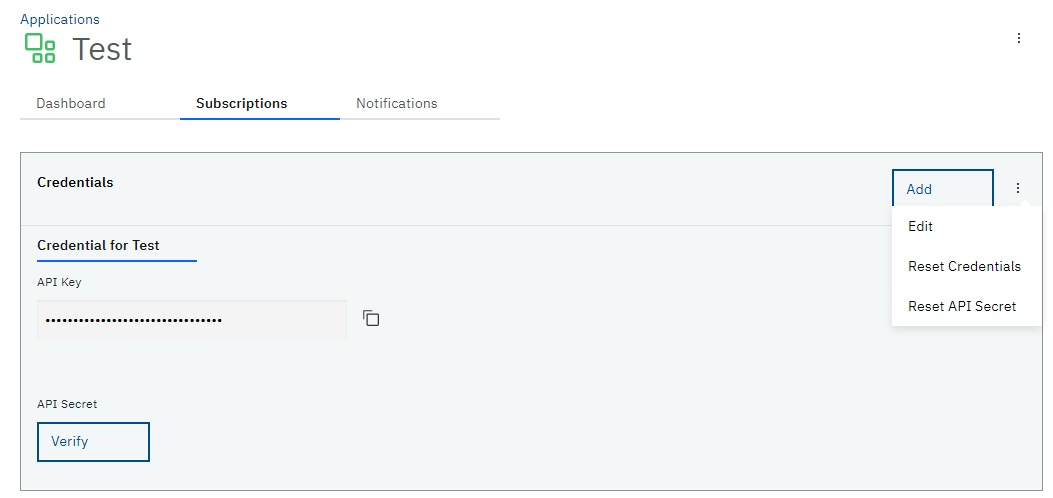
Make sure to note your API Secret, as it is only shown once. Since your API Secret is stored encrypted, we cannot retrieve or display it again if you forget it.
You can reset your API Secret, which will update the stored value and provide you with a new one. To do this, click "Apps" in the main menu, select the application in question, and then click the "Reset API Secret" link in the "Subscriptions" section.
Invite members
Invite other members of your organization.
Choose an API plan
After your application is registered, you need to subscribe to API Product and choose a plan.
We are offering:
- Account Information
- Consents Service API
- Confirmation of funds Service API
- Account Information Service API
- Payment Initiation
- Payment Initiation Service API
The plan you select determines the environment — either simulation or production. Available plans on the Developer Portal include:
- Simulation
- Default Plan
All plans on the Developer Portal are free of charge. The Bankart API portal provides mandatory PSD2 APIs. API specifications are available as Swagger files in the API Product section of the menu. All APIs follow the Berlin standard and support JSON format.
To subscribe, select your desired product and choose a plan. Next, select an existing application or create a new one. Once your application is subscribed, you can use the provided credentials to access all APIs included in the subscribed products.
Upload certificate
To access the simulation or production APIs, you must have a valid eIDAS certificate (X.509 PEM format) uploaded to the developer portal for your application. You can upload the certificate either when creating a new app or later by editing an existing app.

After adding your certificate and redirect URL, you are able to use all PSD2 APIs, according to your given role.
Use PSD2 APIs in the Sandbox Environment
It is possible to test an API from this developer portal with static data in the sandbox environment by subscribing to the sandbox API. Before using test cases below, please read the API documentation and swagger definitions under "API Product" tab.
In Bankart API portal mandatory PSD2 APIs are available. All APIs follow Berlin standard, JSON format is supported. APIs published on the portal are sandbox versions and return static answers. All data in the tables below is intended for testing and has no relation to real data. Data in tables can change at any time without prior notice.
Consents Service API
| consentId | |
|---|---|
| POST /consents | *token is mandatory (read section about Oauth2) |
| GET /consents/{consentId}/status | 6dd7e042-963f-4e28-9a50-334a167a44ba |
| GET /consents/{consentId} | 6dd7e042-963f-4e28-9a50-334a167a44ba |
| DELETE /consents/{consentId} | 6dd7e042-963f-4e28-9a50-334a167a44ba |
Account Information Service
| API | IBAN | CURRENCY | Consent-ID | withBalance | account-id | transactionId |
|---|---|---|---|---|---|---|
| GET /accounts | SI56051001001033999 | EUR | 12345 | TRUE | ||
| SI56051001001033999 | EUR | 123456 | FALSE | |||
| SI56051001001044999 | EUR | 1234567 | TRUE | |||
| GET /accounts/{account-id} | SI56051001001033999 | EUR | TRUE or FALSE | 8735076338630656 | ||
| SI56610000018109471 | EUR | FALSE | 8735076338658900 | |||
| GET /accounts/{account-id}/transactions | SI56051001001033999 | EUR | FALSE | 8735076338630656 | ||
| SI56051001001044999 | EUR | TRUE | 8735076338630333 | |||
| GET /accounts/{account-id}/transactions/{transactionId} | SI56051001001033999 | EUR | 8735076338630656 | 2030000202303039 | ||
| SI56051001001044999 | EUR | 8735076338630545 | 2030000202303040 | |||
| GET /accounts/{account-id}/balances | SI56051001001033999 | EUR | 8735076338630656 | |||
| SI56031101000397567 | EUR | 8735076338630655 |
Payment Initiation Service API
| API | payment-service | payment-product | paymentId |
|---|---|---|---|
| POST /{payment-service}/{payment-product} | payments | sepa-credit-transfers | * token is mandatory |
| GET /{payment-service}/{payment-product}/{paymentId} | payments | sepa-credit-transfers | 73bafcc1-ddc1-4c58-abcc-3b4de6e5e482 |
| GET /{payment-service}/{payment-product}/{paymentId}/status | payments | 73bafcc1-ddc1-4c58-abcc-3b4de6e5e482 | |
| payments | 73bafcc1-ddc1-4c58-abcc-3b4de6e5e222 | ||
| DELETE /{payment-service}/{payment-product}/{paymentId} | payments | sepa-credit-transfers | 73bafcc1-ddc1-4c58-abcc-3b4de6e5e482 |
| *with SCA | payments | sepa-credit-transfers | 73bafcc1-ddc1-4c58-abcc-3b4de6e5e222 |
Payment Instrument Issuing
| API | IBAN | CURRENCY | Expected result |
|---|---|---|---|
| POST /funds-confirmations | SI56051001001033999 | EUR | "true" |
| SI56051001001033988 | EUR | "false" | |
| SI56051001001033977 | EUR | "true" | |
| SI56051001001011977 | EUR | "false" |